Availability polls
Forget the endless "who's free on Tuesday?" on WhatsApp. You propose 2-5 time slots, everyone votes inside the app and, as soon as 4 players confirm, we turn it into a match automatically.
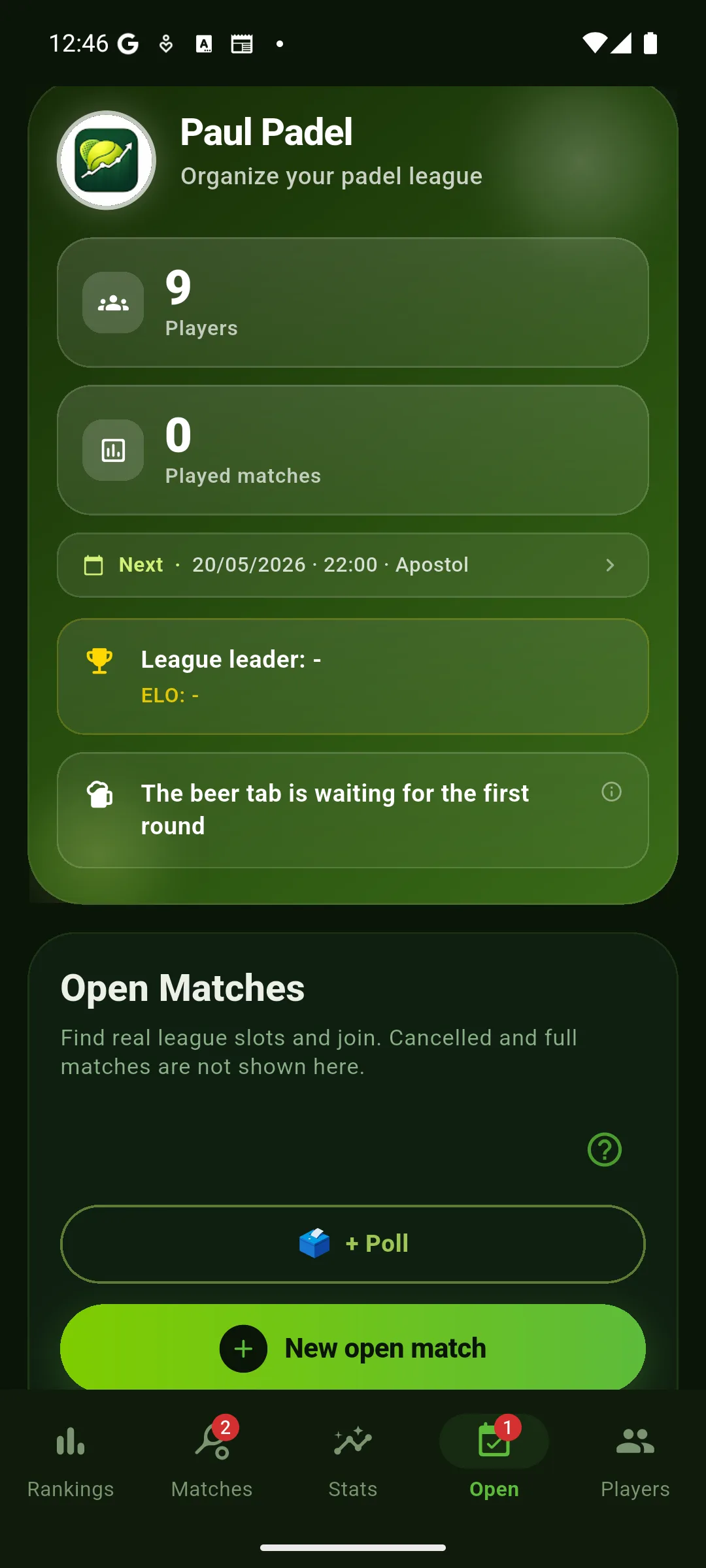 "+ Poll" button on the Open tab
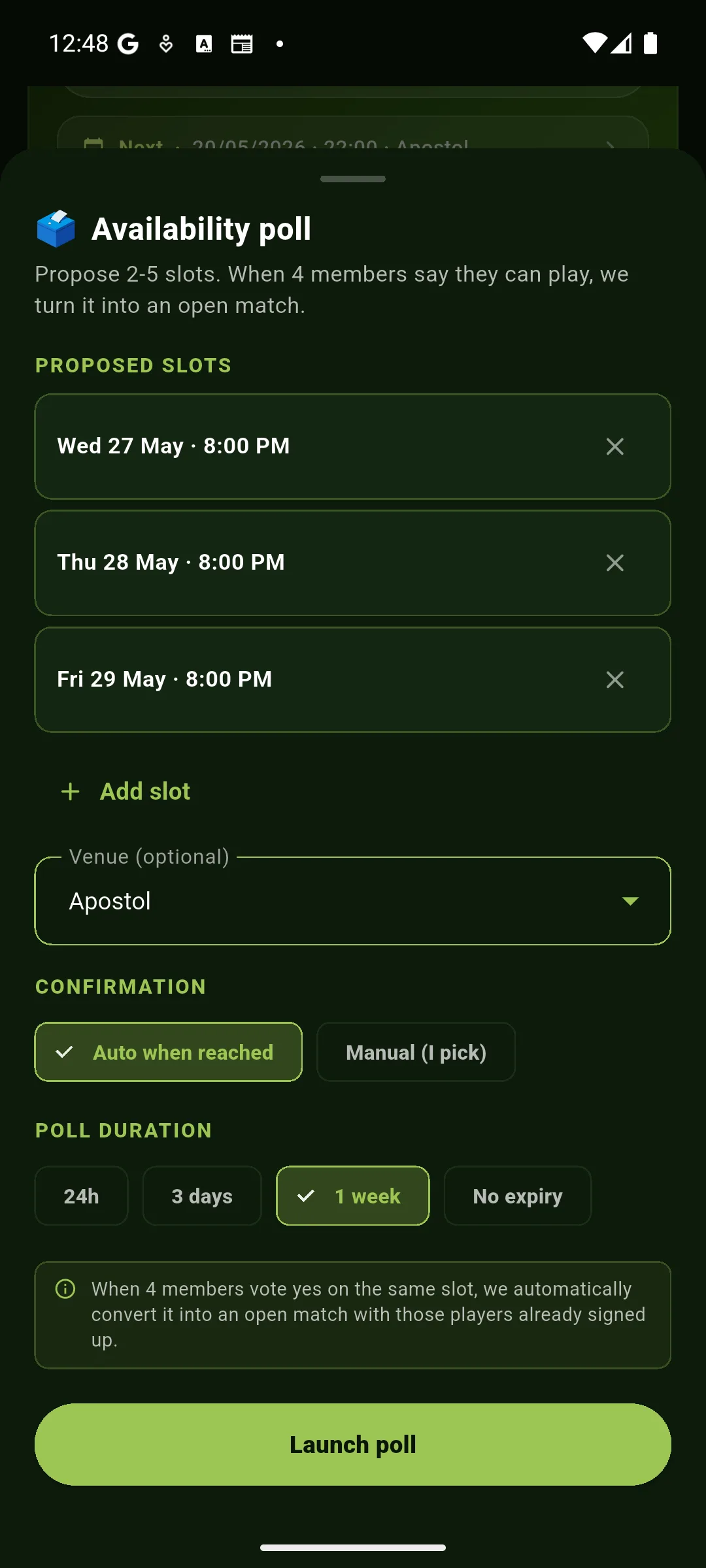 Creation modal: slots, venue, mode and duration
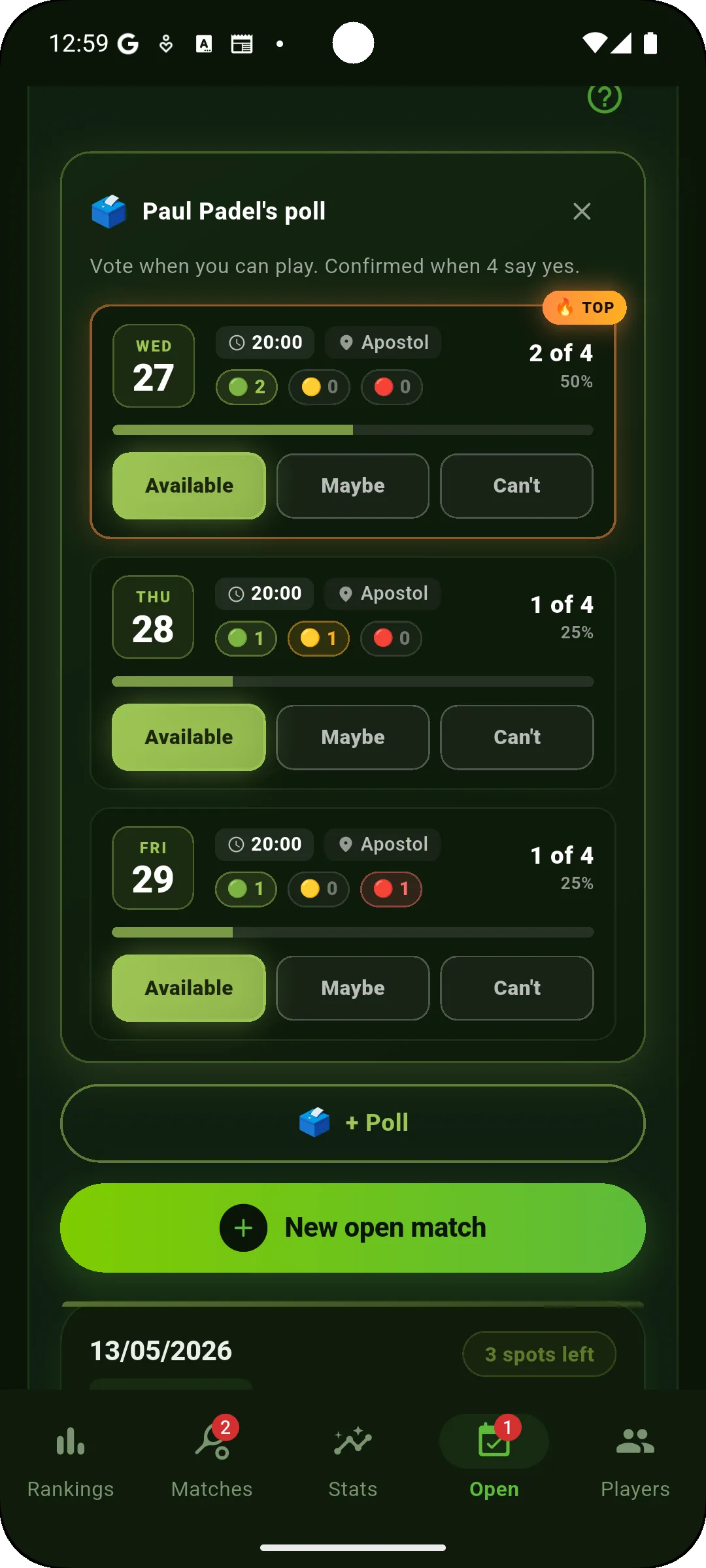 Live poll with per-slot vote counters
How to create a poll
How voting works
Each slot has three buttons: 🟢 Available, 🟡 Maybe, 🔴 Can't make it. Only the Yes votes count toward confirmation.
As you vote you'll see:
- X of 4 with a progress bar for each slot.
- 🔥 TOP on the slot with the most yes votes (the current "favorite date").
- An amber bar when a slot is one vote away from closing.
Auto mode (default)
As soon as a slot hits 4 available players:
- The poll is marked as closed instantly.
- An Open match is created with the 4 players already signed up.
- Everyone gets a push: "🎉 Match locked in!"
- The match shows up under Matches · Pending, waiting for the result.
Manual mode
The poll doesn't close on its own even if 4 players are available. You decide when. Useful when you want to give more people a chance to vote, or pick the date with the fewest conflicts even if another one has more votes.
- You'll see a "Close and pick date" button below the poll title.
- Tap it and a picker appears with slots ranked 🥇 🥈 🥉 by number of available players.
- Pick a date and the app generates the match exactly like in Auto mode.
Waiting list
If a slot is confirmed with more than 4 available, the extras go onto a waiting list visible on the open match. If one of the 4 starters drops out, the first person on the list is bumped in automatically and gets a push: "🎟️ You're in the match!".
Who can create polls?
- Basic plan: up to 2 polls per month, max 3 dates per poll.
- PRO plan: unlimited polls and dates, manual mode, waiting list, matchmaking and advanced stats.
Voting is always free for every member — only the organizer needs PRO if they're going to run a lot of polls.
Open matches
For when you've already got the day and venue but you're still short a few players: open the match with 1, 2 or 3 spots free and other members sign up from the app.
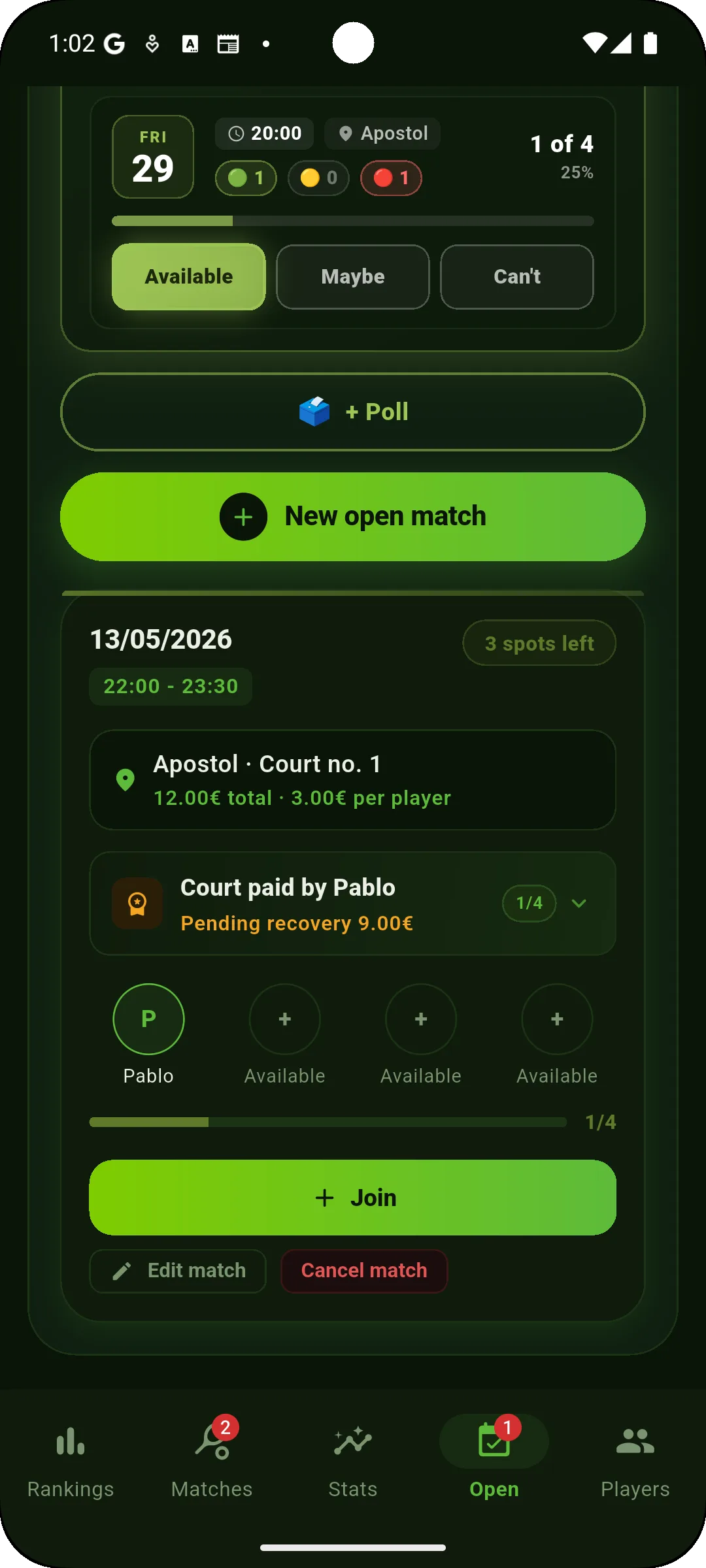
Flow
- Tap "+ New open match" on the Open tab.
- Set date, time, venue and court number. Indicate if the court is already paid and by whom.
- Other members get a push and can sign up with one tap.
- Once the 4 spots are filled, the match moves to Pending and waits for the result.
If someone drops out before play, the others get a "free spot" push so they can cover it.
Pending matches
When a match has a date, a venue and 4 confirmed players but hasn't been played or recorded yet, it shows up under Pending. From there you can score it live, simulate the result, edit details or cancel it.
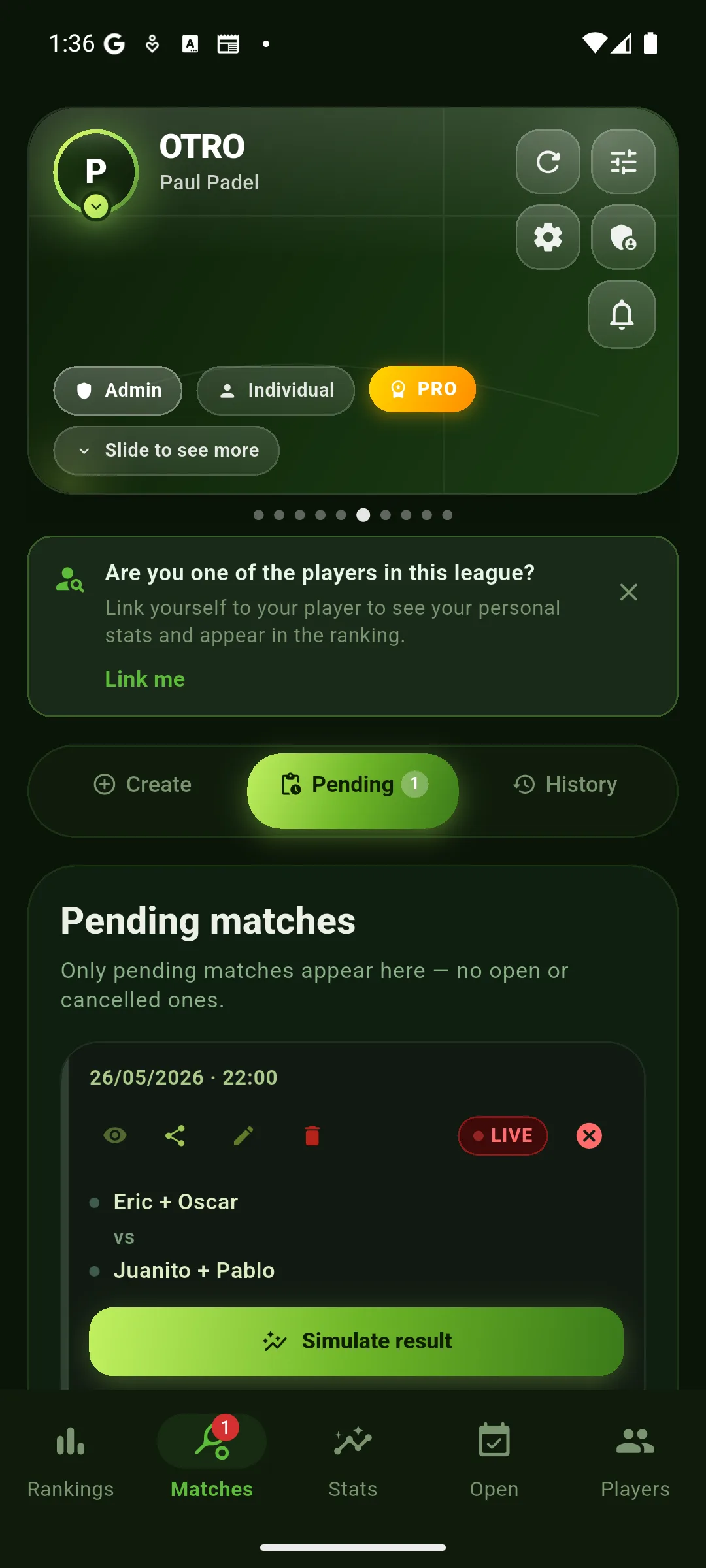
Available actions
- Score live: opens the interactive point-by-point scoreboard (watch-compatible).
- Share: a link and an image so the rest of the group can follow the match. If it's an outdoor venue, the message and the image also include the weather forecast (temperature, wind and rain probability) for that day and time.
- Edit: change date, venue or players before scoring.
- Cancel: the match is removed from pending without adding ELO.
Simulate result
If you just want to record the final score without scoring point by point, tap "Simulate result". Enter the games for each set and the app closes the match, recalculating ELO and rankings instantly.
- Handy when someone shares the result over WhatsApp and it wasn't scored live.
- The match counts for ELO and ranking exactly the same as one scored live.
- It doesn't generate advanced analysis (MVP, momentum, win probability) — for that you have to score point by point from the watch.
Spectator mode
While a match is being scored there's only one scorekeeper at a time so the score isn't duplicated — but that role can be handed off between devices, and anyone can follow the live score in spectator mode (read-only), whether they play in the match or not.
Why there's a single scorekeeper (at a time)
If two players added points at the same time, the score would double up. That's why the app locks the role on the first person in — everyone else syncs with their scoreboard instead of running their own. The lock prevents scoring in parallel, not the role from changing: the scoreboard can be passed to another player whenever it suits (see below).
What the spectator sees
- On the phone: big scoreboard with the latest point, closed sets, a "👁 SPECTATOR" badge in the top right and a button to mute or activate TTS narration.
- On the watch (Wear OS and Apple Watch): the same read-only scoreboard mirrors onto your wrist. Scoring buttons hidden, spectator badge visible.
- Watch mic: in spectator mode the only active button is "How's it going?" — tap it and the watch reads the current score out loud. Useful between points so you don't have to pull out your phone.
- Watch speaker: leave it on and the watch announces every change (game, set, match) as soon as the scorekeeper logs it.
When the lock is released
- When the scorekeeper saves the match (closes the result).
- When the scorekeeper cancels and exits — spectators see "Match cancelled" and are automatically taken back.
- If the scorekeeper closes the scoreboard without saving, the next person to open it can become the new scorekeeper.
What if two open at the exact same moment?
Scorekeeper assignment happens inside an atomic Firestore transaction: even if both fingers tap in the same millisecond, only one wins the lock and the other comes in as a spectator. There's no way to end up with two scorekeepers fighting it out.
Hand off the scorer between devices NEW
The same person doesn't have to score every time: the scorer can hand off the role by tapping "Pass scorer" and choosing someone who is following the match; and between phones you can also take turns by grabbing the scoreboard. There's always a single active scorer, so points are never double-counted. That said: if someone is scoring with the watch on the court, everyone else joins as a spectator only so they don't interrupt them. Ideal for sharing the role or scoring from both sides of the court.
Spectator eye: watch live without playing NEW
On live matches an eye 👁 icon appears on the match card. Anyone can tap it to open the scoreboard in spectator mode (read-only), even if they aren't playing that match. It's free: perfect for spectators, the bench, or following another pair's match in your league.
Local mode (no login)
If you open the app without logging in you create a league that lives only on your phone. Perfect for trying things out, an impromptu tournament with friends or just kicking the tires before committing to an account.
What does work
- 1 local league with as many players as you want (think of them as cards you keep).
- Match scoreboard from the phone.
- ELO and ranking for your local league.
- Weather for outdoor venues (uses a public API, no account needed).
What needs login
- More than one league. In local mode you're capped at 1.
- Scoring from the watch and voice commands (PRO features tied to your account).
- Polls and open matches: they need other users to coordinate.
- Spectator mode for the live scoreboard.
- Inviting other users to your league.
- PRO and advanced stats.
- Sync across devices: in local mode, if you lose the phone you lose the league.
To switch to logged-in mode, open the account menu in the top left and pick your sign-up method (email, Google or Apple).
Guest mode
Got your cousin or a mate filling in today who isn't part of the league? Add them as a guest player and they play like any other, without messing up everyone else's ranking.
Player ≠ user
The app has two distinct concepts that are worth keeping straight:
- Player: a card inside your league (a name that shows up in matches). The admin creates them with the "Add player" button. No email or account required.
- User: a person with a Padel Rank account (signed up with email/Google/Apple). Only users can see the league from their own phone.
A player can be linked to a user (if the admin sends them an invite and they accept it) or not. Until they're linked, the guest sees nothing from the league on their phone — they're just a card you carry around.
When you add a player in a regular (logged-in) league you can mark them as a guest:
- Their matches don't count toward ELO or the stats of the other league players.
- Their history is still saved — but it sits outside the official ranking.
- If the admin doesn't send them a user invite, the card exists but the guest will never see the league.
- If the admin does invite them and they accept, they'll be able to see the details of the matches they played in — but it still doesn't affect anyone else's ranking while they're flagged as a guest.
Balancing skill (don't skew the ELO)
Guest mode is also handy when a player is well above or well below the level of the rest. Marking them as a guest stops that mismatch from unfairly penalising or boosting everyone else's ELO. Once they're at a similar level to the group, remove the mark and they start to count.
- The match counts for nobody. If 3 regulars + 1 guest play, the 3 regulars don't gain or lose ELO that day either: the whole match is neutral.
- It's a per-player mark, not per-match. Meant for someone who is consistently a different level, not to toggle match by match (removing it recomputes their whole history).
From guest to member
When a guest becomes a regular and you want them to count in the ranking, the admin (or any league editor) removes the guest flag from their card. At that moment the app recalculates every stat including their full match history — ELO, streaks, h2h, the lot. Nothing gets lost; what was off the books becomes part of the record.
Weather for outdoor courts
We don't just tell you if it'll rain during the match: we also tell you if it rained in the hours before.
- Forecast during the match with time and expected rainfall.
- Rain accumulated over the previous 6 hours — key for knowing if the court is wet even if the sun is out now.
- Wind and temperature at match time.
- Estimated court condition: dry, damp or waterlogged.
- Heat alert: above 30°C we remind you to stay hydrated.
The alert appears automatically when you create a match at an outdoor venue with coordinates configured. And when you share a pending outdoor match, that same forecast also travels in the text and image you send.
Weather-change alerts NEW
A 24-hour forecast can change. So if you have an outdoor match and the rain probability rises, we let you know with a notification:
- ~24 h before: a first heads-up if the forecast worsens, with time to reorganize.
- 6-8 h before: a second, more refined alert (the closer it gets, the more reliable).
It's automatic and free: only for matches at a located outdoor venue. You don't have to turn anything on; if the weather doesn't worsen, you get nothing.
How to call the points
The eternal debate of amateur padel: "was that your mistake or their winner?". To stop arguing over every ball and call the point quickly without conflict, we recommend a binary, objective, observable rule.
Why this rule
- It's binary: "did you touch the ball?" has one answer. No debate about whether it was forced or not.
- It's observable on the spot: all 4 players hear the paddle-ball contact.
- It speeds up the match: no stopping to argue intentions.
- It matches the FIP rule: the official rulebook counts it as a "lost point" when a player touches the ball and doesn't return it properly (including touching it with their body).
Edge cases
- Ball that clips the frame or side with no real attempt to return (you were out of range, the ball was going past on its own, it was an accidental touch) → ATTACKER'S POINT. An accidental touch isn't an attempt to return.
- Ball that hits your partner's body → DEFENDER'S FAULT. The point goes to the attacking team even if you didn't touch the ball.
- Ball that hits the opponent's body → ATTACKER'S POINT. Any contact with the defender's body is a fault on them (FIP rule).
- Ball that clips the net and drops in as a winner → ATTACKER'S POINT. The "let" only applies on the serve, during play the bounce counts — etiquette does ask you to say "sorry" 😉.
- Ball that goes out before the paddle touches it, but the opponent fakes a return → ATTACKER'S POINT. The gesture doesn't count if there was no contact.
This is a recommendation, not a mandate. If your league has a different convention you prefer, stick with it — what matters is that all 4 players apply the same rule all season long.
Calling out the how by voice NEW
If you score from the watch by voice, on top of who wins you can call out how the point ended with just three commands. It's optional: saying only "point" and "fault" still gives you the full scoreboard, but adding "pressure" unlocks the shot quality metrics (winners, forced and unforced errors).
When the match ends, the analysis names the most aggressive player (most winners + forced) and the most consistent (fewest unforced errors), and those figures add up across the season in the league stats tab. In touch mode, long-press a player to mark their fault; "pressure" is voice-only.
Scoreboard from your watch PRO
Score the match in real time without pulling your phone out of your bag. Available on Apple Watch and Wear OS.
It unlocks with the PRO plan, or free for the matches of your club's leagues if you belong to a club on the CLUB plan. In your personal leagues without PRO, the watch shows a notice and won't let you score.
How it works
- When you start a match on the watch, the phone stays in sync in real time.
- You tap the pair that wins each point and the app handles games, sets, deuce, golden point and so on.
- In super-tiebreak matches the serve rotation is applied automatically every 2 points.
- When the match closes, ELO is updated instantly.
Voice commands
Tap the watch mic and say things like:
"Point Tom"— Tom wins the point (winner)."Pressure Tom"— Tom wins by forcing the rival's error."Fault Eve"— Eve loses the point on an unforced error (adds to the opposing team)."John serves"— announces who's serving."Who serves?"— reminds you whose turn it is to serve (help command)."Score"— reads out the full score.
The first three feed the shot quality metrics. Works in Spanish, English, French, German, Italian and Portuguese.
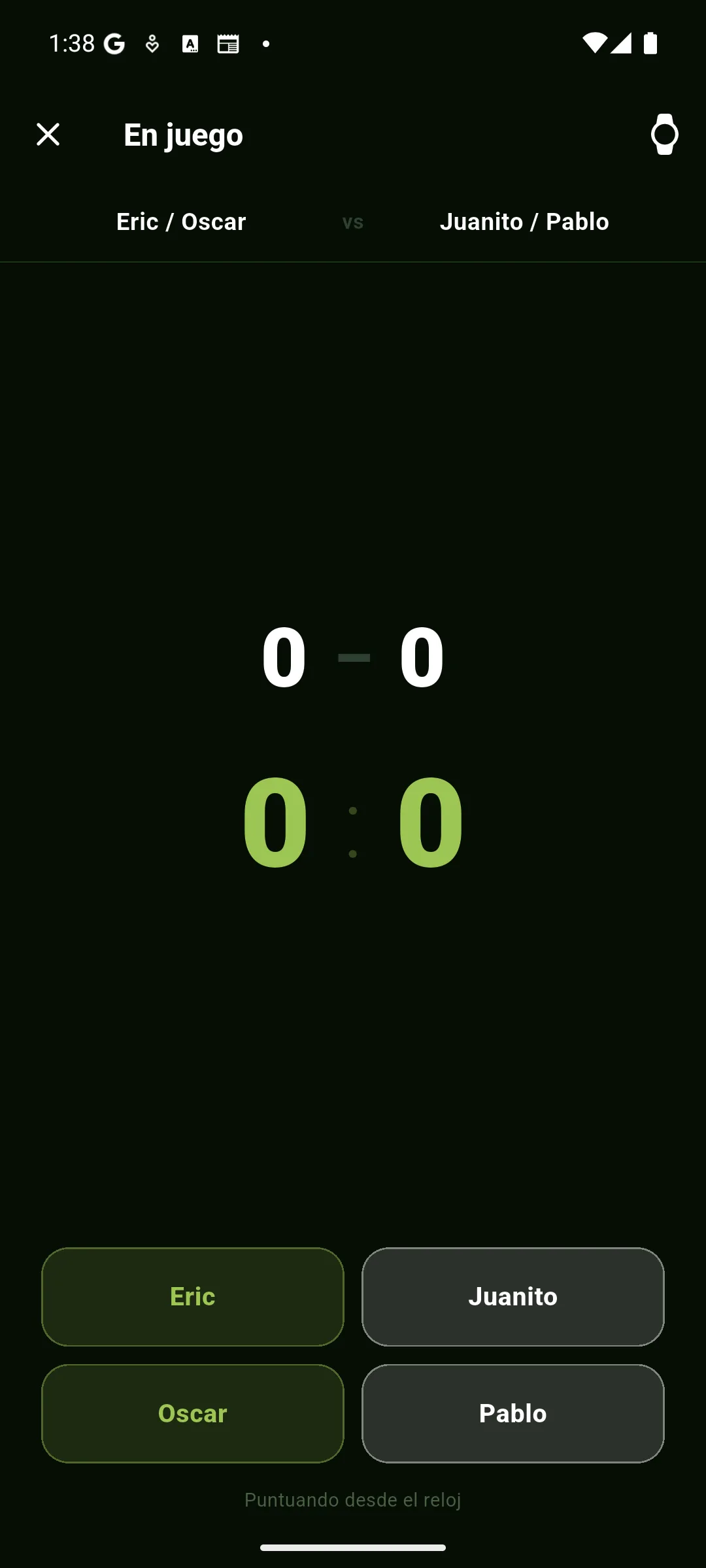
Court display NEW
Turn a tablet or a phone into a giant scoreboard for the whole court. Huge score, big names and the player serving in gold — readable from the other side.
Court display mockup — the serve in gold and the context of the moment up top
How to use it
- Open the match's live scoreboard and tap "Court display".
- Prop it against the fence or on a stand; the screen stays on.
- It shows the current game, each pair's games and sets, the serve in gold and the context of the moment (GOLDEN POINT, set point, match point…).
"Follow only" mode
When you turn it on you can choose "Follow only": the tablet shows the live score without taking the scorekeeper role. That way a second tablet (or a spectator's phone) displays the score without taking control away from whoever is scoring — even if they use the same account.
Match analysis PRO
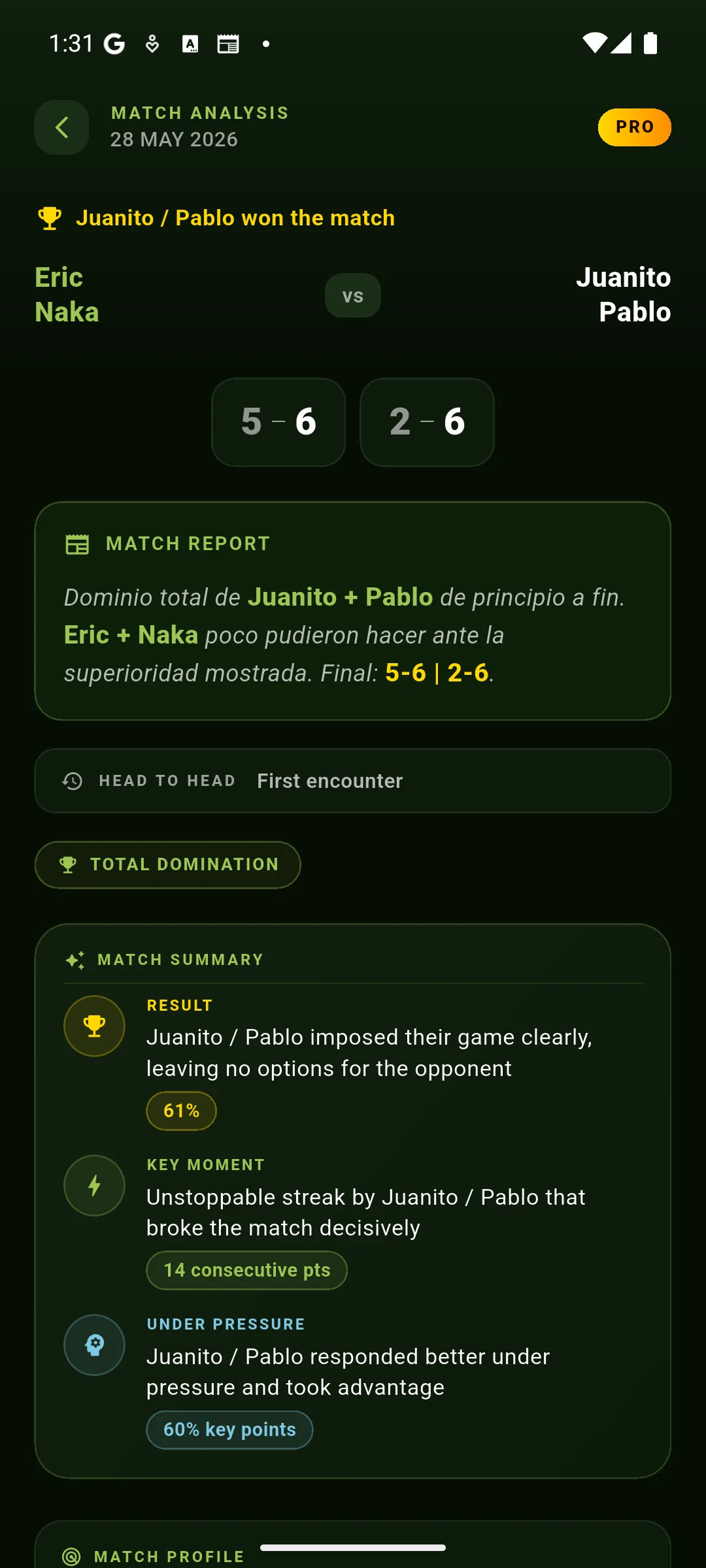
The story, the MVP, the turning point, win probability, point-by-point momentum map, pressure points, serve & breaks, pentagonal radar and the fridge effect. All the magic only kicks in when you record the match point by point (phone or watch).
What you'll see
- Story: one-line narrative summary of the match.
- MVP: the most decisive player, with their contribution in points won / errors.
- Win probability: chart showing how the odds of winning shifted point by point.
- Turning point: the game that defined the match.
- Momentum map: visualization of the runs across the match.
- Pressure points: how each pair responded at 40-40, set point and match point.
- Pentagonal radar: visual comparison across 5 axes (dominance, pressure, winners, errors, streak).
- Shot quality NEW: winners, forced and unforced errors per team, plus the most aggressive and most consistent player. Requires calling the points by voice.
- Serve & breaks NEW: service games, held and broken — per pair and per player. So you can see if your serve gets broken and, above all, whose: maybe yours never gets broken but your partner's does three times.
Effective match time NEW
When someone scores a match with the scoreboard (phone or watch), Padel Rank records the exact moment of every point. That gives you a new card in the analysis with how long the match really lasted and other metrics no other padel app provides:
Mockup with sample data — this is how it looks in the app
What each metric tells you
- Effective time · The total match from the first point to the last. It does not include the warm-up beforehand or any "we ran late". It is the real play.
- Per set · A stacked bar where each color represents a set, proportional to its duration. It lets you visually see which set was the longest and where the match was decided.
- Pace (pt/m) · Points played per minute. Above 2 is an intense match, below 1 is slow-paced. It tells you how "fluid" the game was.
- Avg. between points · Seconds that passed on average between calls. It excludes long breaks (changeover, water, arguments) so it is representative of effective play.
- Median per game · The duration of the "typical" game. Useful because the average gets distorted by an 8-minute game at deuce after deuce.
- Longest game · The most hard-fought game of the match, with the set score where it happened. It is usually a tightly contested break point.
- Longest break · The longest interruption of the match and where it happened. It identifies the rest between sets or the "this isn't working" moment.
- Start vs scheduled · How late or early you started vs the calendar time. Useful to know whether your league is punctual.
ELO simulator PRO
The ranking crystal ball. Before the match is played, see exactly how much ELO each player would gain or lose depending on who wins and the final score. Perfect for sizing up before the match who has more to lose.
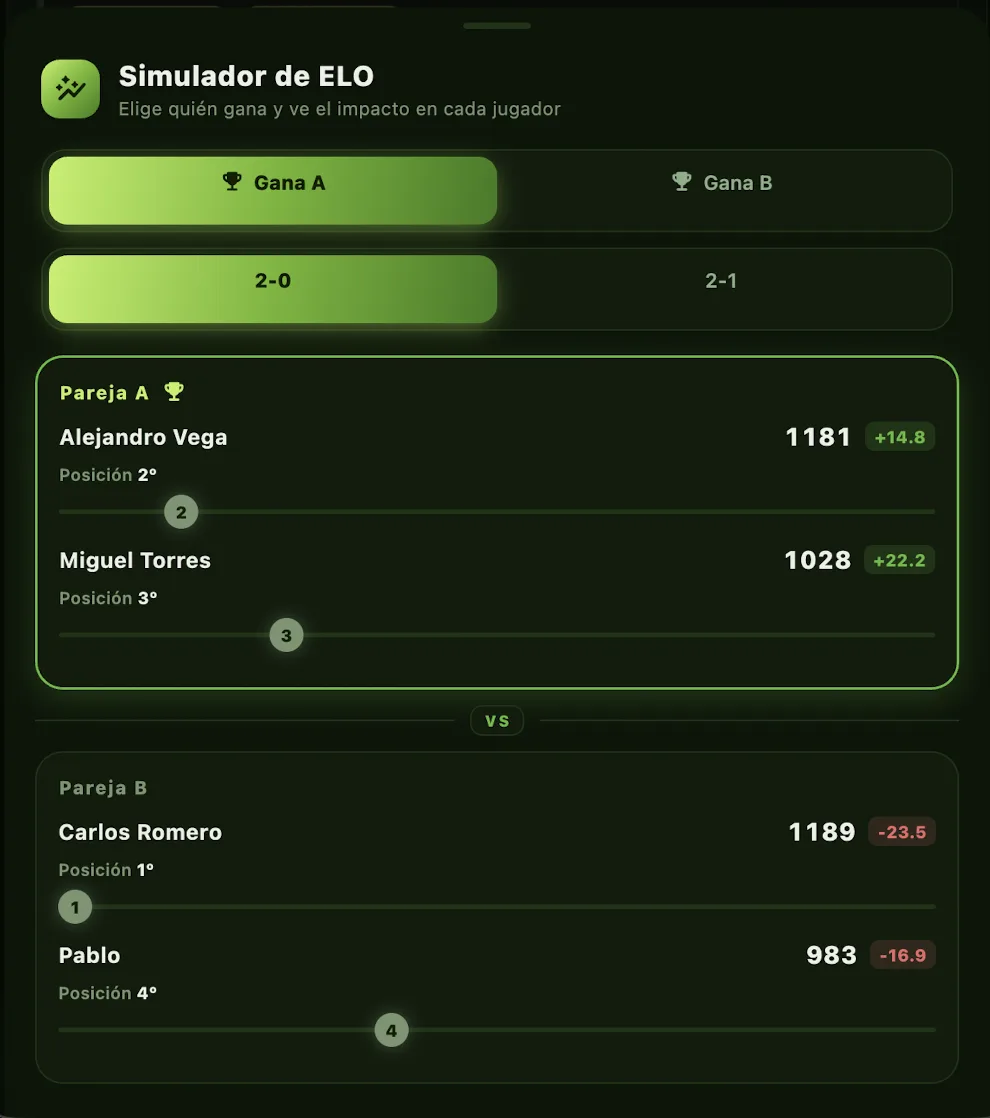
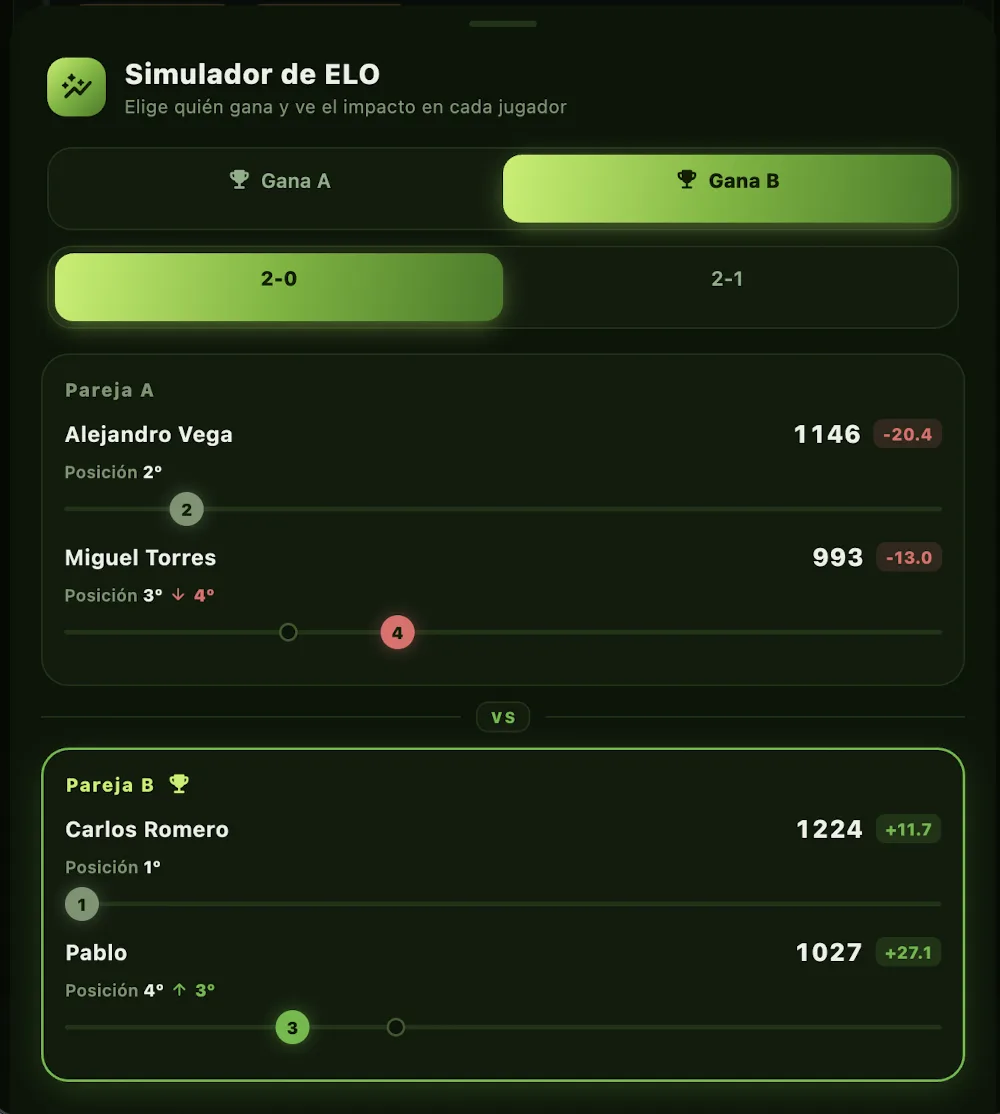
What it's for
- Friendly trash talk: "if I lose this one I drop to fourth" — knowing what's on the line ramps up the motivation.
- Calibrating matchups: see whether a match would be fair or guaranteed pain for one side.
- Estimating the ceiling: how much do I need to win to overtake the leader.
- After the match, use the actual scenario to confirm exactly what changed in your ELO.
The simulator numbers are exactly the same ones the app will apply if the match is played with that result: same ELO formula, same K-factor, same score multiplier. It's not an approximation.
Fridge effect
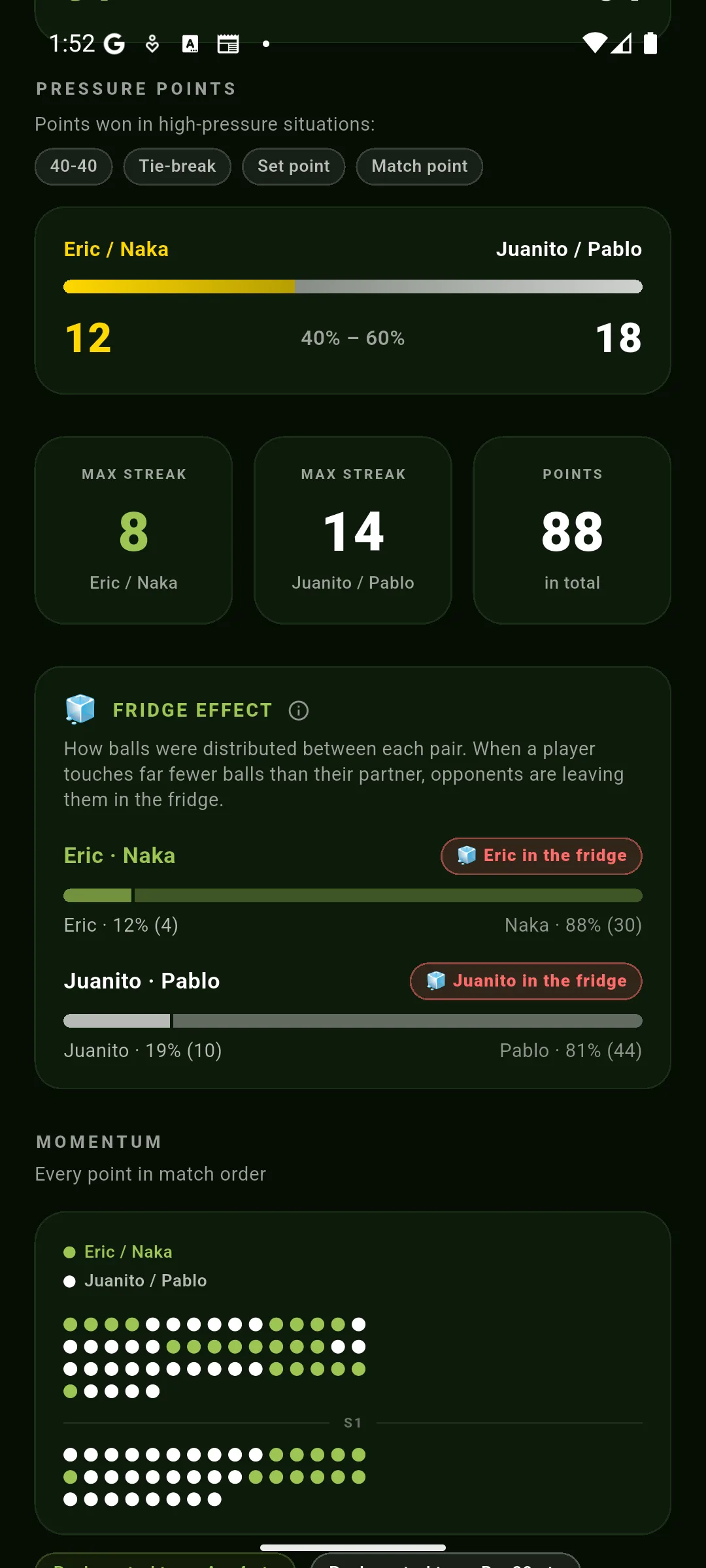
A classic padel tactic: if the other pair has one player who's clearly better, you hit every ball at the partner and leave the strong one "in the fridge", not touching the ball. This metric flags when it's happening.
Thresholds
- Below 28%: SEVERE effect. They're being systematically avoided.
- Between 28% and 38%: MODERATE effect. Clear asymmetry but not extreme.
- 38% or more: normal ball share, no detectable fridge.
Useful for understanding what happened on court: if you got left in the fridge, you were probably the dangerous one on your pair and the opponents neutralized you. If it went the other way and your partner touched 80% of the balls, you were the one carrying the match.
Point balance PRO
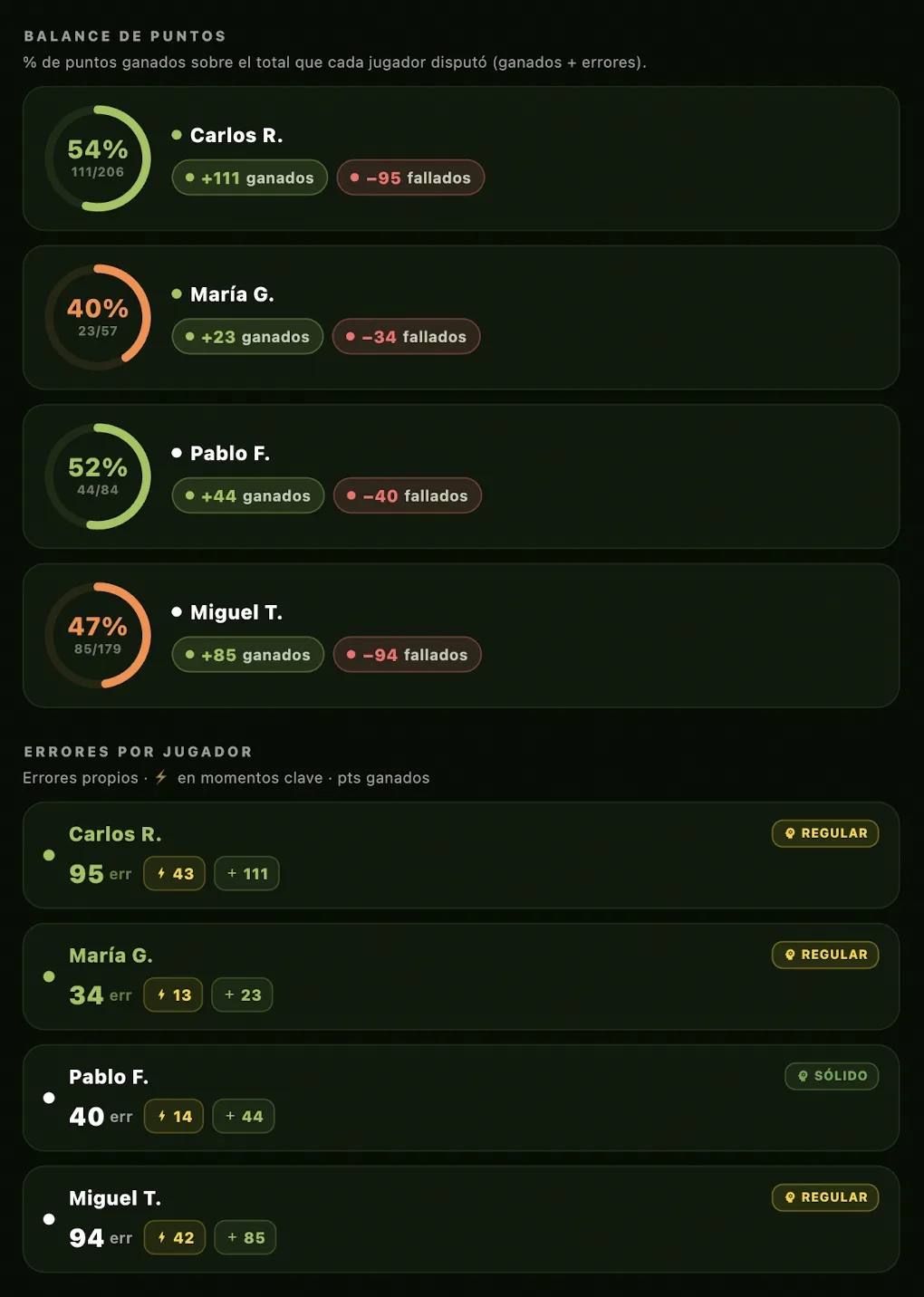
The answer to "who decided this match?" in a single chart. For each player, a donut showing the % of points won out of the total they played (won + errors).
How to read the donut
- Lime ring ≥ 50%: positive player — wins more points than they miss.
- Orange ring 40-50%: average — roughly even balance.
- Red ring < 40%: negative — more errors than winners in this match.
The center of the donut shows the absolute ratio (e.g. 142/209 = 142 points won out of 209 played). To the right of the donut: +won and −missed chips in raw numbers.
Pairs with the fridge effect
This metric and the fridge complement each other: the fridge effect tells you how many balls you touched, point balance tells you how many you converted into points. A player can come out looking good in the fridge stat (touched a lot) but bad in the balance (missed them all), or the other way around.
Medals & achievements
Every match you play and every result unlocks medals on your profile — a way to track your progress and have a friendly rivalry with your group. There are 15 achievements: most are earned just by playing, and 4 are PRO (they use the point-by-point data from watch/voice scoring).
For everyone
With scoring data PRO
These four need points scored with the watch or by voice (with per-player attribution).
Club panel CLUB
If you run a club or academy with several leagues, the CLUB plan adds a panel above all of them. Available on the CLUB plan (coming soon).
What's included
- Club global ranking: a unified leaderboard across all the club's leagues (wins, matches and %), merging the same player across leagues.
- Overview: number of leagues, unique players and matches at a glance.
- Branding: club logo and color applied to the panel.
- Announcements: post events and news, pushed to the members of the club's leagues.
- Export: download the club ranking as CSV.
- Unlimited leagues within the club.
Do I need to pay to play in a club?
No. You can take part in a club's leagues as a free user: it's the club that keeps the subscription, not each player.
- Your account stays Free: being a club member costs you nothing.
- While you play in that club's leagues, you enjoy the premium features within them (Liga Ranking, promotions and relegations, advanced stats for those leagues…), because the club covers them.
- In your personal leagues, outside the club, your own plan's limits apply: premium access doesn't carry over to what you do on your own.
- If the club no longer has a CLUB plan, its leagues return to standard limits, but your data and matches are kept.
Liga Ranking CLUB
A pyramid competition: several divisions where pairs move up and down between groups based on each round's results (typically each quarter). Available on the CLUB plan (coming soon).
How it works
- Each division is a club league, ordered from 1 (the top) downward.
- When a round closes, the top of each group goes up and the bottom goes down. The app proposes the moves and you adjust them before confirming.
Rulesets
- Standard: the top N go up and the bottom N go down in each division.
- Pyramid: points scoring (set +1, match +3, and +3 for playing all your matches) and positional promotion/relegation. Includes withdrawal handling (a win for the rival) and a minimum number of matches per round.
Basic vs PRO
The basics are always free. PRO unlocks the watch, voice, unlimited polls, waiting list, matchmaking and advanced stats.
Basic (free)
- Up to 2 leagues as organizer.
- Scoring from your phone, real-time ELO, open matches, badges.
- Up to 2 polls per month with max 3 dates per poll.
- 6 languages.
PRO
- Everything in Basic plus:
- Scoring from Apple Watch / Wear OS.
- Voice commands.
- Unlimited polls, unlimited dates, manual mode.
- Waiting list + auto-promotion.
- Automatic 2-match matchmaking.
- Advanced stats (radar, dominance, win probability, fridge effect).
- League availability stats.
- Up to 10 leagues as organizer.
- Priority support.